Quick Answer#
Paste your property's iCal export URL from Airbnb or Vrbo into Property Setup & Sharing. Clean Report uses it to create a turnover automatically for each guest checkout, and refreshes it on its own every few minutes as well as whenever you tap Sync.
If you manage several listings through a property management system, connecting it directly may be faster than pasting a calendar link for each property one at a time — see Connecting Your Property Management System (PMS).
Why This Matters#
Without a synced calendar, a cleaner only knows about a turnover if the owner tells them about it manually every time a booking changes. Syncing the calendar means new bookings, cancellations, and date changes flow through to the cleaner without the owner having to relay them by hand.
Getting Your Calendar URL#
Both Airbnb and Vrbo provide private, property-specific .ics export links. Clean Report connects directly to this calendar feed to keep upcoming turnovers synced in real time.
If you use both Airbnb and Vrbo to attract guests to the same condo or property, both calendars need to be included so bookings from either service create turnovers. Use a combined calendar feed that contains both calendars, such as one provided by your channel manager, when connecting the property to Clean Report.
Follow the step-by-step guides below for your booking platform:
Airbnb Guide: How to Obtain Your Calendar URL#
Clean Report automatically monitors your Airbnb calendar so turnovers are scheduled right when guests check out. Follow these 6 simple steps to copy your iCal link from Airbnb.
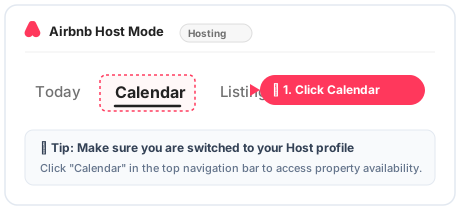
Step 1: Go to Airbnb, Switch to Host & Click Calendar#
Log into your Airbnb Account (make sure you are switched to your Host profile). In the top navigation bar, click on Calendar.
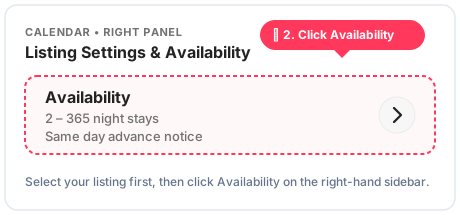
Step 2: Select Property & Click Availability#
Select the property you want to connect to. In the right-hand panel of your calendar view, click on Availability.
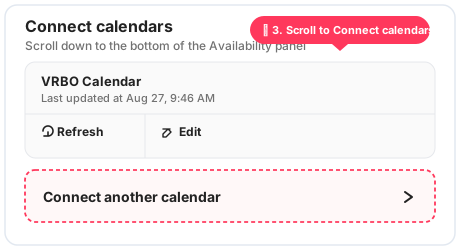
Step 3: Scroll Down to "Connect calendars"#
Scroll down to the bottom of the Availability settings panel until you reach the Connect calendars section.
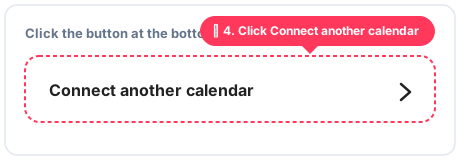
Step 4: Click "Connect another calendar"#
Click the Connect another calendar button at the bottom of the section.
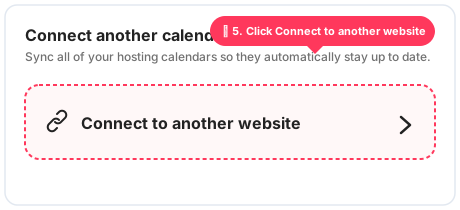
Step 5: Click "Connect to another website"#
In the dialog that appears, click Connect to another website to view your calendar export link.
Step 6: Copy Your Calendar Link#
Under Step 1, click the black Copy button and your Airbnb calendar link will be saved to your clipboard.
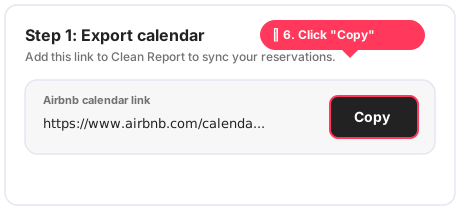
Sample Airbnb iCal URL format:
https://www.airbnb.com/calendar/ical/12345678.ics?s=a1b2c3d4e5f6g7h8
Vrbo Guide: How to Obtain Your Calendar URL#
Clean Report automatically monitors your Vrbo calendar so turnovers are scheduled right when guests check out. Follow these 4 simple steps to copy your iCal link from Vrbo.
Step 1: Go to Availability under Settings#
Log into your Vrbo Owner Portal, go to your Property → Calendar. In the right-hand panel under Settings, click on Availability (next to Pricing).
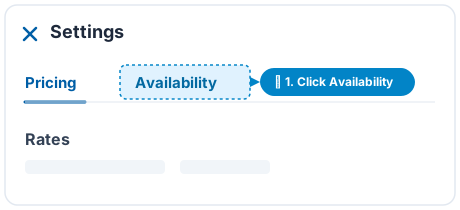
Step 2: Click "Calendar sync" / "Connect calendars"#
Scroll down to the bottom of the Availability settings panel and click on Calendar sync (or Connect calendars).
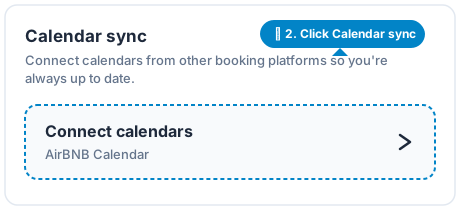
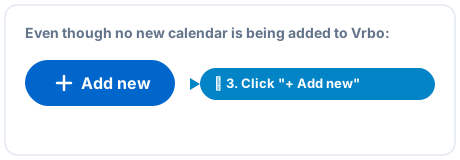
Step 3: Click "+ Add new"#
Click the blue + Add new button (even though no new calendar is being added to Vrbo; this opens the export step).
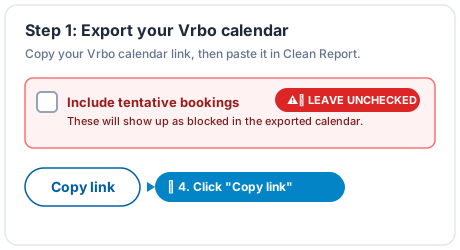
Step 4: Leave Tentative Bookings Unchecked & Copy Link#
Under Step 1: Export your Vrbo calendar, make sure "Include tentative bookings" is UNCHECKED, then click Copy link.
⚠️ Important Reminder: Keep "Include tentative bookings" unchecked. Tentative reservations can cause false turnover cleans and disrupt cleaner schedules.
Sample Vrbo iCal URL format:
https://www.vrbo.com/icalendar/fd629480798842f79f7ead4abd0e2b9e.ics?nonTentative
Connecting Your Calendar Link to Clean Report#
Once you have copied your calendar link from Airbnb or Vrbo:
- When adding a new property: Immediately after saving your property details, Clean Report opens the calendar connection modal where you can paste your link directly.
- On an existing property: From your owner dashboard, open the property and select Property Setup & Sharing. Scroll to the Calendar URL field.
- Paste your copied
.icslink into the input field. - Click Save Calendar Link (or tap Sync Now to pull in live booking dates immediately). Clean Report will automatically refresh reservations in the background every few minutes.
Step-by-Step#
- Open the property and go to Property Setup & Sharing.
- Paste the calendar URL into the calendar sync field and save.
- Select Sync to pull in bookings immediately, or wait — Clean Report also checks for updates on its own every few minutes.
- Review the property's upcoming cleanings to confirm turnovers were created from your bookings.
What Syncing Actually Does#
Each time your calendar is checked, Clean Report looks for checkouts that don't already have a turnover and creates one automatically. If a booking's dates change or a reservation is cancelled, Clean Report reconciles that against turnovers that haven't been started yet. A turnover a cleaner has already started or submitted isn't overwritten by a later calendar change.
Frequently Asked Questions#
What happens if my calendar URL is invalid or the platform can't be reached? Clean Report shows a "Calendar sync failed" message with the specific reason (for example, an invalid URL or a fetch error) so you know the sync didn't succeed rather than silently doing nothing.
Can I sync both an Airbnb and a Vrbo calendar to the same property? Each property currently supports one calendar URL. If you list on both platforms to attract guests to the same condo or property, both calendars need to be included. Export a combined calendar containing both Airbnb and Vrbo bookings from your channel manager, then add that calendar URL to the property.
Does syncing notify my cleaner automatically? Yes — when a new turnover is created from a synced calendar, the cleaner can be texted the property's access link automatically.